AI Creative

Turn your product photointo an ad video.

The creative studio takes your product from your store, proposes the idea, shows you a draft and produces it once you approve. Ad videos and ad images come out at the right size for every channel.

You see the price before production; unused credit is refunded.

Real output

One product photo in, this video out.

The video below was produced with this studio and put on display as is. The input was a single product photo and a brand name.
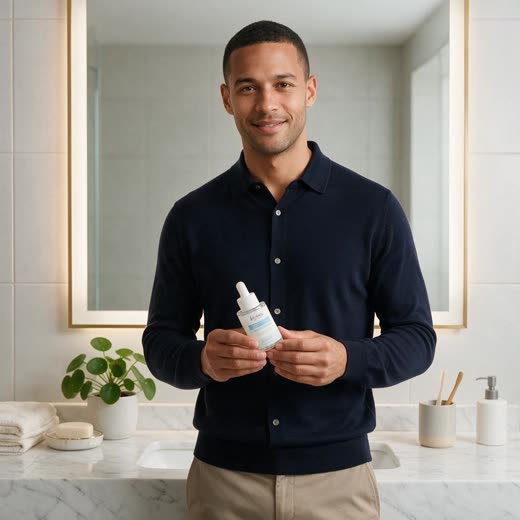
Input: a man holding a face serum in front of a bathroom mirror
Input
Brand
Kynure
Product
Face serum
Output

Ad video · 9:16 · 8 s

Kynure is a fictional brand; the example comes from a real production in the product's own library.

How it works

Four steps; you make the calls.

At every step the studio tells you what it will do and asks for approval where it matters. If you want to direct scene, lens and camera, "Let me direct" mode is there.

Product

Pick a product from your store or upload a photo. The first question is the size: 9:16, 4:5, 1:1 or 16:9.

Kynure · Face serum 30 ml

From your store · Shopify

Size

  • 9:16
  • 4:5
  • 1:1
  • 16:9

The idea, draft and credit figures are examples.

Pricing

See the price first, then produce.

Credits are calculated from what the models actually cost. Before you approve you see a ceiling and an estimate; when the job ends the real cost is deducted and the rest comes back to you.

Up to 520 · estimated 460 credits

Shown before you approve. Nothing has been spent yet.

Figures are examples; a 15-second ad video is typically estimated at a few hundred credits.

  • Real cost

    Credits are reconciled with the models' actual bills; the estimate is a ceiling, not an invoice.

  • Failed jobs are fully refunded

    If production can't complete, every reserved credit comes back.

  • The AI doesn't spend for you

    The AI's no-approval credit allowance is zero by default; only the workspace owner can raise it.

Sizes

The right size for every channel.

An image's first question is where it will run. Pick the channel and the sizes follow; no cropping one by one.

Instagram and Facebook feed · 2 sizes

1080×1350
1080×1080

Formats

  • Single imageOne set across all the channel's sizes
  • Series5–10 frames telling one story
  • Carousel3–10 cards; Instagram, Facebook and LinkedIn feeds
  • Publish packFiles per channel, ready to upload

For video

  • 9:16
  • 4:5
  • 1:1
  • 16:9

Four ratios and 6 to 60 seconds. Meta Reels, Stories and Feed; TikTok; YouTube Shorts; LinkedIn and X placements.

Brand and quality

Your brand in every frame.

The studio reads your brand kit on every production and takes notes as it learns. Every take passes a quality judge before it reaches you.

  • Brand kit

    Tone, colours, typeface, logo, end-card call to action, dos and don'ts. Enter them once and every production reads them.

  • AI notes

    It writes notes about your brand as it works. You can see, delete or pin them.

  • Quality judge

    Every take is compared with the product photo. If the product doesn't match, the take is redone before you see it.

  • Sound and finish

    Turkish or English voice-over, music, subtitles and an end card come with the video.

Create from chat, too

The buttons in the AI Agent's composer open a short form: drop in your logo or product and make a few choices. Anything that spends credit still goes through an approval card.

Ask for something or pick a flow below…

  • Mockup set

    Drop your logo: T-shirt, mug, business card, sign… realistic presentation shots.

  • Brand kit

    Colours, type and tone of voice from your logo and site — I will set it up.

  • Find my logo

    I will find your logo on your connected accounts and save it.

There are analytics and catalogue flows too; type / in the composer to list them all.

First step

See it run on your own account.

The agents read your account, propose, and wait. Nothing goes live until you approve it — so there is nothing to undo.

Every feature on every plan. No commitment, cancel any time.